


HTML DOM测试应用
作者:网络转载 发布时间:[ 2013/9/25 16:23:44 ] 推荐标签:
5.DOM在WEB测试中的显著优势
利用DOM完成QTP无法完成的任务
使用CurrentStyle验证对象
HTML源码:
<style>
.class_visible{visibility:"visible"}
.class_hidden{visibility:"hidden"}
</style>
<div class=class_hidden id="ID_001">
<p>DHTML using DISPLAY</p>
</div>
QTP中代码:
Set oElementDocument=Browser("micClass:=Browser").Page("micClass:=Page").WebElement("html id:=ID_001").Object
isVisible=oElementDocument.currentstyle.visibility
If isVisible="hidden" Then
msgbox "object is hidden"
Else
msgbox "object is visible"
End If
此处如果用QTP的Exist方法,结果永远返回True。因为此对象的确是存在于网页中,但是被设置了不可见,而Exist方法只能验证对象是否存在,却不能验证是否隐藏。
而Document对象下的currentstyle可以直接访问style sheets。
利用DOM提升性能
当对象较多时,使用DOM较为占优势,数量越多越明显,比如有1000个文本框的HTML页面,每个文本框的name属性都由text_开头,之后由1到1000递增,脚本如下:
<html>
<head>
<script language="vbscript">
function msg
for i=1 to 1000
tt=tt+"<input type='text' name='text_"+cstr(i)+"'>"
next
Document.getElementByID("aaa").innerHTML=tt
end function
</script>
</head>
<body>
<input type="button" value="click it" onclick="msg">
<div id="aaa"></div>
</body>
</html>
把以上脚本保存成HTML,打开此HTML,点击按钮生成1000个文本输入框。比较QTP描述性编程和DOM操作脚本的性能。
QTP描述性编程脚本:
Services.StartTransaction "inputvalue"
For i=1 to 1000
Browser("micClass:=Browser").Page("micClass:=Page").WebEdit("name:=text_"+cstr(i)).Set "value"+cstr(i)
Next
Services.EndTransaction "inputvalue"
结果:
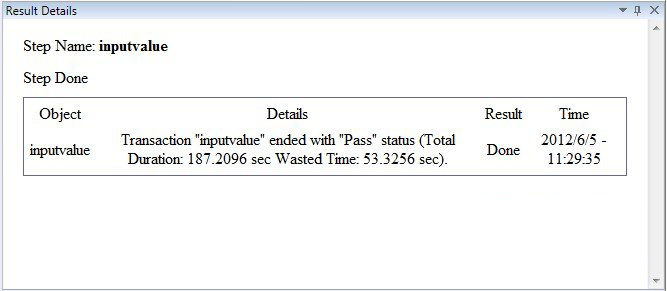
DOM操作脚本:
Services.StartTransaction "inputvalue"
For i=1 to 1000
Browser("micClass:=Browser").Page("micClass:=Page").Object.getElementsByName("text_"+cstr(i))(0).value="value"+cstr(i)
Next
Services.EndTransaction "inputvalue"
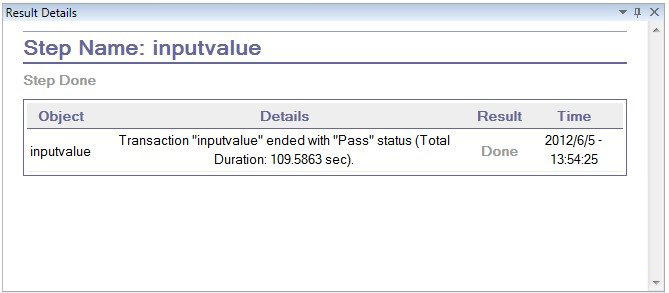
结果:












 sales@spasvo.com