


iOS开发之抽屉效果实现
作者:网络转载 发布时间:[ 2014/11/13 14:51:58 ] 推荐标签:iOS 软件开发 移动开发 抽屉
三、使用PPRevealSideViewController来实现抽屉效果
当然了首先在pch文件中引入我们的第三方类库,然后使用即可
1.在storyboard拖出来我们要用的视图控制器,点击主界面上的按钮会以抽屉的形式展示出导航页,然后在导航页导航到各个界面,之后在从各个页面回到主界面
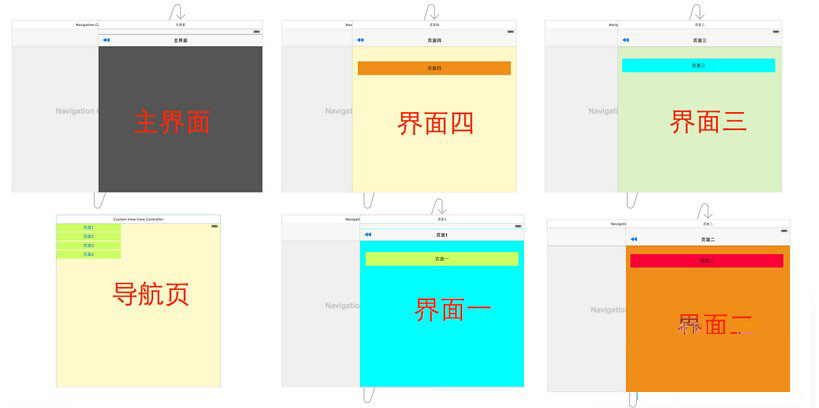
2.在AppDelegate中初始化我们的PPRevealSideViewController并设置为启动页面代码如下:
1 - (BOOL)application:(UIApplication *)application didFinishLaunchingWithOptions:(NSDictionary *)launchOptions {
2 // Override point for customization after application launch.
3
4 self.window = [[UIWindow alloc] initWithFrame:[[UIScreen mainScreen] bounds]];
5
6 //获取主视图的导航控制器
7 UIStoryboard *storyboard = [UIStoryboard storyboardWithName:@"Main" bundle:[NSBundle mainBundle]];
8 UIViewController *vc = [storyboard instantiateViewControllerWithIdentifier:@"NavigationController"];
9
10 //新建PPRevealSideViewController,并设置根视图(主页面的导航视图)
11 PPRevealSideViewController *sideViewController = [[PPRevealSideViewController alloc] initWithRootViewController:vc];
12
13 sideViewController.fakeiOS7StatusBarColor = [UIColor whiteColor];
14
15 //把sideViewController设置成根视图控制器
16 self.window.rootViewController = sideViewController;
17
18 [self.window makeKeyAndVisible];
19
20 return YES;
21 }












 sales@spasvo.com