


iOS中使用Reachability 检测网络
作者:网络转载 发布时间:[ 2014/12/1 11:25:51 ] 推荐标签:操作系统 iOS 网络
使用notification的方式
- (void)viewDidLoad
{
[super viewDidLoad];
DLog(@"开启 www.apple.com 的网络检测");
Reachability* reach = [Reachability reachabilityWithHostname:@"www.apple.com"];
DLog(@"-- current status: %@", reach.currentReachabilityString);
// start the notifier which will cause the reachability object to retain itself!
[[NSNotificationCenter defaultCenter] addObserver:self
selector:@selector(reachabilityChanged:)
name:kReachabilityChangedNotification
object:nil];
[reach startNotifier];
}
- (void) reachabilityChanged: (NSNotification*)note {
Reachability * reach = [note object];
if(![reach isReachable])
{
self.notificationLabel.text = @"网络不可用";
self.notificationLabel.backgroundColor = [UIColor redColor];
self.wifiOnlyLabel.backgroundColor = [UIColor redColor];
self.wwanOnlyLabel.backgroundColor = [UIColor redColor];
return;
}
self.notificationLabel.text = @"网络可用";
self.notificationLabel.backgroundColor = [UIColor greenColor];
if (reach.isReachableViaWiFi) {
self.wifiOnlyLabel.backgroundColor = [UIColor greenColor];
self.wifiOnlyLabel.text = @"当前通过wifi连接";
} else {
self.wifiOnlyLabel.backgroundColor = [UIColor redColor];
self.wifiOnlyLabel.text = @"wifi未开启,不能用";
}
if (reach.isReachableViaWWAN) {
self.wwanOnlyLabel.backgroundColor = [UIColor greenColor];
self.wwanOnlyLabel.text = @"当前通过2g or 3g连接";
} else {
self.wwanOnlyLabel.backgroundColor = [UIColor redColor];
self.wwanOnlyLabel.text = @"2g or 3g网络未使用";
}
}
- (void)viewDidLoad
{
[super viewDidLoad];
DLog(@"开启 www.apple.com 的网络检测");
Reachability* reach = [Reachability reachabilityWithHostname:@"www.apple.com"];
DLog(@"-- current status: %@", reach.currentReachabilityString);
// start the notifier which will cause the reachability object to retain itself!
[[NSNotificationCenter defaultCenter] addObserver:self
selector:@selector(reachabilityChanged:)
name:kReachabilityChangedNotification
object:nil];
[reach startNotifier];
}
- (void) reachabilityChanged: (NSNotification*)note {
Reachability * reach = [note object];
if(![reach isReachable])
{
self.notificationLabel.text = @"网络不可用";
self.notificationLabel.backgroundColor = [UIColor redColor];
self.wifiOnlyLabel.backgroundColor = [UIColor redColor];
self.wwanOnlyLabel.backgroundColor = [UIColor redColor];
return;
}
self.notificationLabel.text = @"网络可用";
self.notificationLabel.backgroundColor = [UIColor greenColor];
if (reach.isReachableViaWiFi) {
self.wifiOnlyLabel.backgroundColor = [UIColor greenColor];
self.wifiOnlyLabel.text = @"当前通过wifi连接";
} else {
self.wifiOnlyLabel.backgroundColor = [UIColor redColor];
self.wifiOnlyLabel.text = @"wifi未开启,不能用";
}
if (reach.isReachableViaWWAN) {
self.wwanOnlyLabel.backgroundColor = [UIColor greenColor];
self.wwanOnlyLabel.text = @"当前通过2g or 3g连接";
} else {
self.wwanOnlyLabel.backgroundColor = [UIColor redColor];
self.wwanOnlyLabel.text = @"2g or 3g网络未使用";
}
}
附件demo说明
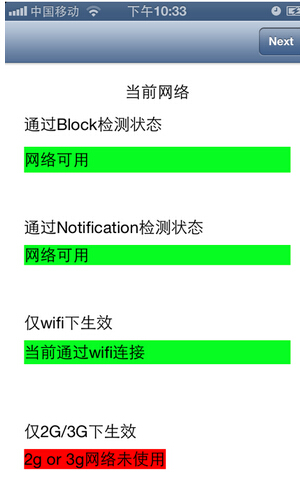
开启wifi状态
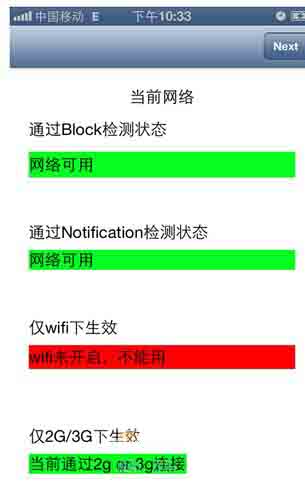
关闭wifi的状态
遗留问题
如何在多个controller之前共用一个Reachability(附件demo中是一个controller一个Reachability实例)
应该在什么使用停止Reachability的检测.












 sales@spasvo.com