


每个Java开发者都应该知道的5个JDK工具
作者:网络转载 发布时间:[ 2014/12/19 17:13:57 ] 推荐标签:Java 软件开发
jmap工具来生成堆转储,我们应该使用-dump参数,下面jhat工具可以使用的参数列表:
C:UsersCycle>jhat-help
Usage:jhat[-stack][-refs][-port][-baseline][-debug][-version][-h|-help]
-J Pass directly to the runtime system.For
example,-J-mx512m to use a maximum heap size of 512MB
-stack false:Turn off tracking object allocation call stack.
-refs false:Turn off tracking of references to objects
-port:Set the port for the HTTP server.Defaults to 7000
-exclude:Specify a file that lists data members that should
be excluded from the reachableFrom query.
-baseline:Specify a baseline object dump.Objects in
both heap dumps with the same ID and same class will
be marked as not being"new".
-debug:Set debug level.
0:No debug output
1:Debug hprof file parsing
2:Debug hprof file parsing,no server
-version Report version number
-h|-help Print this help and exit
The file to read
For a dump file that contains multiple heap dumps,
you may specify which dump in the file
by appending"#"to the file name,i.e."foo.hprof#3".
All boolean options default to"true"
我给jconsole应用程序创建了一个堆转储文件,并使用以下命令来运行进程id 3344:
jmap-dump:format=b,file=heap.bin 3344
现在,堆转储文件准备绪,运行下面命令并且会启动一个服务:
jmap-dump:format=b,file=heap.bin 3344
在控制台输出结果:
C:UsersCycleDesktop>jhat heap.bin
Reading from heap.bin...
Dump file created Sun Nov 16 19:26:35 IST 2014
Snapshot read,resolving...
Resolving 641209 objects...
Chasing references,expect 128 dots..................
Eliminating duplicate references.....................
Snapshot resolved.
Started HTTP server on port 7000
Server is ready.
在浏览器中输入:http://localhost:7000/后便会出来堆转储的详细情况:
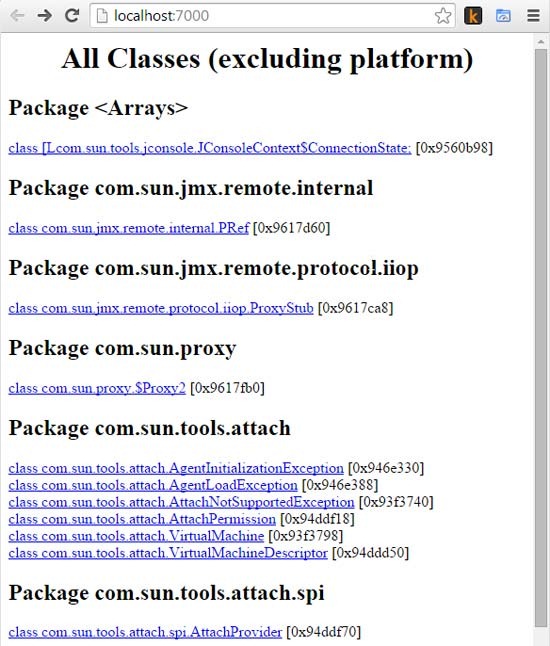
例如,还可以在http://localhost:7000/histo/查看堆内存柱状图。
5.Oracle Java Mission Control
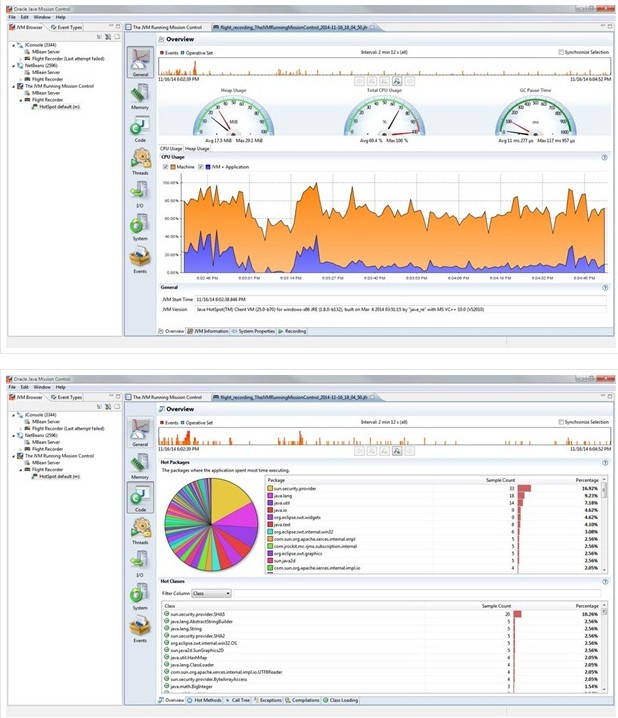
作为JVM融合战略的一部分,主要用来统一HotSpot、JRockit VMs。目前,JRockit Mission Control在标准版Java SE中已经可以使用。Java Mission Control(JMC)与Java Flight Recorder一起工作,适用于HotSpot JVM,用来记录核心数据和事件。它是一个调优工具,并且适用于Oracle JDK。一旦出现问题,这些数据可以用来分析。
开发者可以使用jmc命令来创建JMC工具。
本文内容不用于商业目的,如涉及知识产权问题,请权利人联系SPASVO小编(021-61079698-8054),我们将立即处理,马上删除。
相关推荐
Java性能测试有哪些不为众人所知的原则?Java设计模式??装饰者模式谈谈Java中遍历Map的几种方法Java Web入门必知你需要理解的Java反射机制知识总结编写更好的Java单元测试的7个技巧编程常用的几种时间戳转换(java .net 数据库)适合Java开发者学习的Python入门教程Java webdriver如何获取浏览器新窗口中的元素?Java重写与重载(区别与用途)Java变量的分类与初始化JavaScript有这几种测试分类Java有哪四个核心技术?给 Java开发者的10个大数据工具和框架Java中几个常用设计模式汇总java生态圈常用技术框架、开源中间件,系统架构及经典案例等












 sales@spasvo.com