


iOS的OCUnit测试框架
作者:网络转载 发布时间:[ 2014/3/13 11:34:22 ] 推荐标签:iOS 测试框架
2、现有工程中添加Target实现
该种方式添加的单元测试,属于逻辑测试(Logic Testing)。在一个现有工程中,选择菜单File→New→Target…,选择模板iOS→Other中的 “Cocoa Touch Unit Testing Bundle”。
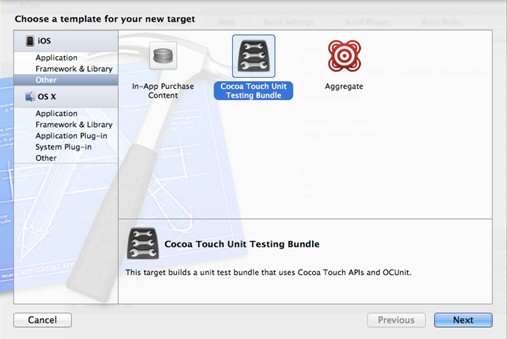
点击Next按钮,在Product Name项目中输入LogicTest,创建完成后,在导航面板中多出了一个LogicTest组,包含LogicTest测试类。在右边的Target栏中多了一个LogicTest Target。
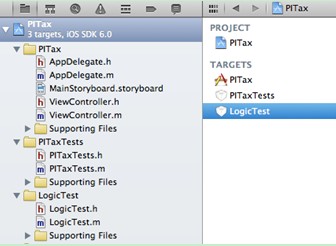
与上一种添加方式不同的是,在Scheme列表中会添加一个LogicTest,这也是我们需要注意的,这也是应用单元测试和逻辑单元测试的另一个 不同之处。运行它需要选择Scheme中LogicTest的iPhone 6.0 Simulator(或iPad 6.0 Simulator)运行,但是不能选择iOS Device,逻辑单元测试只能在模拟器中运行。然后再选择菜单Product→Test、工具栏中Test按钮(下拉Run按钮选择)和快捷键 command+U等几种方式运行。
无论那种方式添加,默认生成的测试类基本都是一样的,下面代码是默认生成的LogicTest测试类中的LogicTest.h和LogicTest.m文件。
01 //
02
03 // LogicTest.h
04
05 // LogicTest
06
07 //
08
09 #import <sentestingkit sentestingkit.h="">
10
11
12
13 @interface LogicTest : SenTestCase
14
15
16
17 @end
18
19 //
20
21 // LogicTest.m
22
23 // LogicTest
24
25 //
26
27 #import “LogicTest.h”
28
29
30
31 @implementation LogicTest
32
33
34
35 - (void)setUp
36
37 {
38
39 [super setUp];
40
41 // Set-up code here.
42
43 }
44
45
46
47 - (void)tearDown
48
49 {
50
51 // Tear-down code here.
52
53 [super tearDown];
54
55 }
56
57
58
59 - (void)testExample
60
61 {
62
63 STFail(@”Unit tests are not implemented yet in LogicTest”);
64
65 }
66
67
68
69 @end </sentestingkit>












 sales@spasvo.com