


Android中使用自身携带的Junit新建一个测试工程
作者:网络转载 发布时间:[ 2015/1/8 14:21:54 ] 推荐标签:Android Junit 白盒测试工具
1、新建立一个Android工程
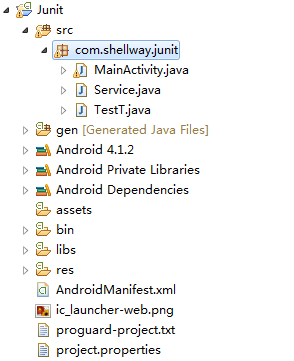
|
package com.shellway.junit;
public class Service {
public int divide(int a,int b){
return a/b;
}
}
package com.shellway.junit;
import junit.framework.Assert;
import android.test.AndroidTestCase;
public class TestT extends AndroidTestCase {
public void test1(){
Service service = new Service();
System.out.println(service.divide(10, 2));
}
public void test2(){
Service service = new Service();
System.out.println(service.divide(10, 0));
}
public void test3(){
Service service = new Service();
Assert.assertEquals(2.5, service.divide(10, 4));
}
}
<?xml version="1.0" encoding="utf-8"?>
<manifest xmlns:android="http://schemas.android.com/apk/res/android"
package="com.shellway.junit"
android:versionCode="1"
android:versionName="1.0" >
<uses-sdk
android:minSdkVersion="16"
android:targetSdkVersion="21" />
<instrumentation
android:targetPackage="com.shellway.junit"
android:name="android.test.InstrumentationTestRunner" />
<application
android:allowBackup="true"
android:icon="@drawable/ic_launcher"
android:label="@string/app_name"
android:theme="@style/AppTheme" >
<uses-library android:name="android.test.runner" />
<activity
android:name=".MainActivity"
android:label="@string/app_name" >
<intent-filter>
<action android:name="android.intent.action.MAIN" />
<category android:name="android.intent.category.LAUNCHER" />
</intent-filter>
</activity>
</application>
</manifest>
|
本文内容不用于商业目的,如涉及知识产权问题,请权利人联系SPASVO小编(021-61079698-8054),我们将立即处理,马上删除。
相关推荐
Android自动化测试框架有哪些?有什么用途?Android测试中最容易忽略的测试点有哪些?Android 手机自动化测试工具有哪几种?移动APP测试之android性能测试快速提升Android App 的代码覆盖率Android Unit Test 框架比较Android单元测试框架Robolectric3.0介绍(一)Android单元测试的整理在Android Studio中实现单元测试Android连接MySQL方法,测试成功关于Android MVP模式的思考Android 数据库管理?ActiveAndroid编写Android测试单元该做的和不该做的事Android阿里面试Java基础锦集在Android项目中使用Java8Java / Android 面试中所遇到的那些坑












 sales@spasvo.com