


ASP.NET MVC微信公共平台开发获取用户消息并处理
作者:网络转载 发布时间:[ 2015/3/26 14:12:15 ] 推荐标签:NET 软件开发 微信 服务器
3.用户消息与服务器消息的加密解密
微信公共平台开发者文档中提供有c++,C#,java等各种语言的加密解密示例,我们用到的是C#,只需要将其中的两个文件添加到项目中即可,Sample.cs是微信团队给出的示例代码,不需要引用,对WXBizMsgCrypt.cs与Cryptography.cs文件添加引用即可。为了进一步封装和方便调用,我又新建了一个类WeChatSecurityHelper
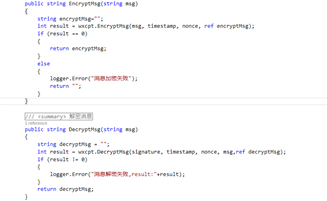
类中的定义两个方法,分别来进行加密(EncryptMsg)和解密(DecryptMsg),创建一个WXBizMsgCrypt对象,调用它的方法加解密,具体代码可见代码示例
1 using System;
2 using System.Collections.Generic;
3 using System.Linq;
4 using System.Text;
5 using System.Threading.Tasks;
6
7 namespace Common
8 {
9 public class WeChatSecurityHelper
10 {
11 /// <summary>
12 /// 定义Token,与微信公共平台上的Token保持一致
13 /// </summary>
14 private const string Token = "StupidMe";
15 /// <summary>
16 /// AppId 要与 微信公共平台 上的 AppId 保持一致
17 /// </summary>
18 private const string AppId = "11111111111";
19 /// <summary>
20 /// 加密用
21 /// </summary>
22 private const string AESKey = "pvX2KZWRLQSkUAbvArgLSAxCwTtxgFWF3XOnJ9iEUMG";
23
24 private static Tencent.WXBizMsgCrypt wxcpt = new Tencent.WXBizMsgCrypt(Token, AESKey, AppId);
25 private string signature,timestamp,nonce;
26 private static LogHelper logger = new LogHelper(typeof(WeChatSecurityHelper));
27
28
29 public WeChatSecurityHelper(string signature, string timestamp, string nonce)
30 {
31 this.signature = signature;
32 this.timestamp = timestamp;
33 this.nonce = nonce;
34 }
35
36 /// <summary>
37 /// 加密消息
38 /// </summary>
39 /// <param name="msg">要加密的消息</param>
40 /// <returns>加密后的消息</returns>
41 public string EncryptMsg(string msg)
42 {
43 string encryptMsg="";
44 int result = wxcpt.EncryptMsg(msg, timestamp, nonce, ref encryptMsg);
45 if (result == 0)
46 {
47 return encryptMsg;
48 }
49 else
50 {
51 logger.Error("消息加密失败");
52 return "";
53 }
54 }
55
56 /// <summary>
57 /// 解密消息
58 /// </summary>
59 /// <param name="msg">消息体</param>
60 /// <returns>明文消息</returns>
61 public string DecryptMsg(string msg)
62 {
63 string decryptMsg = "";
64 int result = wxcpt.DecryptMsg(signature, timestamp, nonce, msg,ref decryptMsg);
65 if (result != 0)
66 {
67 logger.Error("消息解密失败,result:"+result);
68 }
69 return decryptMsg;
70 }
71 }
72 }












 sales@spasvo.com