


Robotium原理之获取WebElement元素
作者:网络转载 发布时间:[ 2015/8/14 11:30:20 ] 推荐标签:自动化测试 软件测试工具
第三步:将提示框中的消息存入WebElement Java bean中
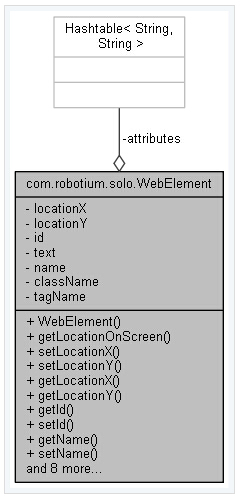
获取到了prompt提示框中的消息后,接下来是对这些已经过处理含特殊格式的消息进行解析处理了,依次得到WebElement的id、text、name等字段。
private WebElement createWebElementAndSetLocation(String information, WebView webView){
String[] data = information.split(";,"); //将消息按;,符号分割,其中;,符号是在前面执行JS时加入的
String[] elements = null;
int x = 0;
int y = 0;
int width = 0;
int height = 0;
Hashtable<String, String> attributes = new Hashtable<String, String>();
try{
x = Math.round(Float.valueOf(data[5]));
y = Math.round(Float.valueOf(data[6]));
width = Math.round(Float.valueOf(data[7]));
height = Math.round(Float.valueOf(data[8]));
elements = data[9].split("\#\$");
}catch(Exception ignored){}
if(elements != null) {
for (int index = 0; index < elements.length; index++){
String[] element = elements[index].split("::");
if (element.length > 1) {
attributes.put(element[0], element[1]);
} else {
attributes.put(element[0], element[0]);
}
}
}
WebElement webElement = null;
try{
webElement = new WebElement(data[0], data[1], data[2], data[3], data[4], attributes);//将id、text、name等字段存入
setLocation(webElement, webView, x, y, width, height);
}catch(Exception ignored) {}
return webElement;
}
/**
* Sets the location of a {@code WebElement}
*
* @param webElement the {@code TextView} object to set location
* @param webView the {@code WebView} the text is shown in
* @param x the x location to set
* @param y the y location to set
* @param width the width to set
* @param height the height to set
*/
private void setLocation(WebElement webElement, WebView webView, int x, int y, int width, int height ){
float scale = webView.getScale();
int[] locationOfWebViewXY = new int[2];
webView.getLocationOnScreen(locationOfWebViewXY);
int locationX = (int) (locationOfWebViewXY[0] + (x + (Math.floor(width / 2))) * scale);
int locationY = (int) (locationOfWebViewXY[1] + (y + (Math.floor(height / 2))) * scale);
webElement.setLocationX(locationX);
webElement.setLocationY(locationY);
}
至此,WebElement对象中包含了id、text、name等字段,还包含了x、y坐标,知道了坐标后可以像其它Android中的原生View一样根据坐标发送点击事件。












 sales@spasvo.com