


如何将SQL执行的错误消息记录到本地文件中
作者:网络转载 发布时间:[ 2013/5/22 10:17:40 ] 推荐标签:
其实大家都知道sql语句的错误信息都可以在sys.messages表里面找到
如:
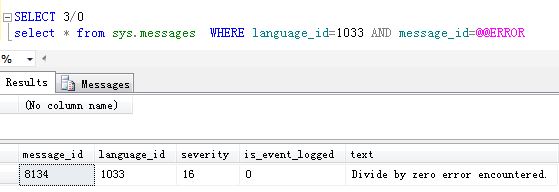
如果在执行语句在try...catch中,我们可以通过以下方法获取错误信息。sql语句如下:
BEGIN TRY
SELECT 3 / 0
END TRY
BEGIN CATCH
DECLARE @errornumber INT
DECLARE @errorseverity INT
DECLARE @errorstate INT
DECLARE @errormessage NVARCHAR(4000)
SELECT @errornumber = ERROR_NUMBER() ,
@errorseverity = ERROR_SEVERITY() ,
@errorstate = ERROR_STATE() ,
@errormessage = ERROR_MESSAGE()
SELECT @errornumber ,
@errorseverity ,
@errorstate ,
@errormessage
RAISERROR (
@errormessage, -- Message text,
@errorseverity, -- Severity,
@errorstate, -- State,
@errornumber
);
END CATCH
View Code
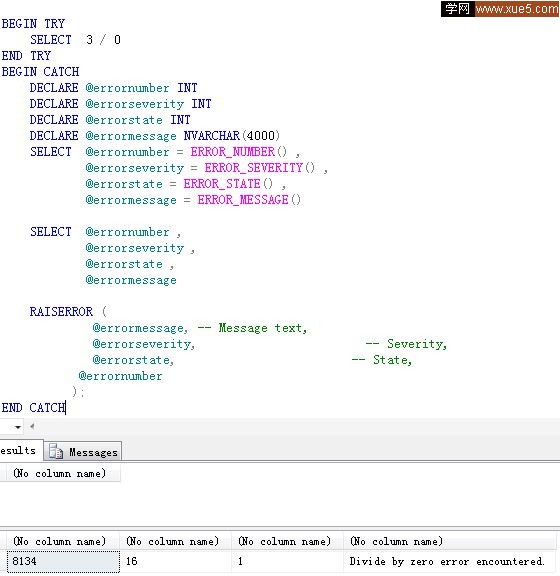
当然我这里是故意用RAISERROR再次抛出错误信息,运行结果如下:
现在我们来定义一个存储过程,其目的是往本地文件中写入信息。
sql脚本如下:
CREATE Proc [dbo].[UCreateOrAppendTextFile](@Filename VarChar(100),@Text nVarchar(4000))
AS
DECLARE @FileSystem int
DECLARE @FileHandle int
DECLARE @RetCode int
DECLARE @RetVal int
DECLARE @CreateOrAppend int
EXECUTE @RetCode = sp_OACreate 'Scripting.FileSystemObject' , @FileSystem OUTPUT
IF (@@ERROR|@RetCode > 0 Or @FileSystem < 0)
RAISERROR ('could not create FileSystemObject',16,1)
EXECUTE @RetCode = sp_OAMethod @FileSystem , 'FileExists', @RetVal out, @FileName
IF (@@ERROR|@RetCode > 0)
RAISERROR ('could not check file existence',16,1)
-- If file exists then append else create
SET @CreateOrAppend = case @RetVal when 1 then 8 else 2 end
EXECUTE @RetCode = sp_OAMethod @FileSystem , 'OpenTextFile' , @FileHandle OUTPUT , @Filename, @CreateOrAppend, 1
IF (@@ERROR|@RetCode > 0 Or @FileHandle < 0)
RAISERROR ('could not create File',16,1)
EXECUTE @RetCode = sp_OAMethod @FileHandle , 'WriteLine' , NULL , @text
IF (@@ERROR|@RetCode > 0 )
RAISERROR ('could not write to File',16,1)
EXECUTE @RetCode = sp_OAMethod @FileHandle , 'Close'
IF (@@ERROR|@RetCode > 0)
RAISERROR ('Could not close file ',16,1)
EXEC sp_OADestroy @filehandle
IF (@@ERROR|@RetCode > 0)
RAISERROR ('Could not destroy file object',16,1)
EXEC sp_OADestroy @FileSystem
----------------------------------------












 sales@spasvo.com