


使用测试度量代码质量
作者:网络转载 发布时间:[ 2013/6/17 10:36:25 ] 推荐标签:
其实,这两段代码并没有什么分支,要大费周张地测试有些多余。好能够在满足覆盖率的情况下只测试order,尽可能减少所谓的“service”。利用Command模式,将“service”压缩到一个。
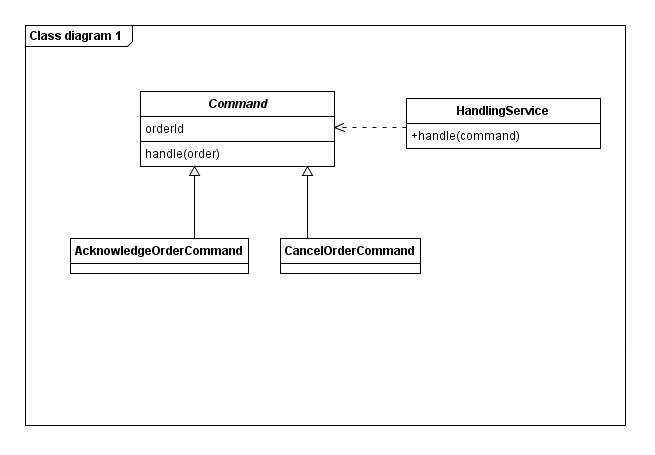
@Test
public void orderIsCanceledAfterCancelling() throws Exception {
final Order order = new OrderFixture().build();
final CancelOrderCommand command = new CancelOrderCommand();
command.handle(order);
assertTrue(order.isCanceled());
}
@Test
public void orderIsAcknowledgedAfterAcknowledging() throws Exception {
final Order order = new OrderFixture().build();
final AcknowledgeOrderCommand command = new AcknowledgeOrderCommand();
command.handle(order);
assertTrue(order.isAcknowledged());
}
经过修改后,在测试中我们不用再编写样板代码(同时产品代码中也不用了),由于Order、Command都可以通过构造函数实例化, 测试场景的准备简单了。而且@Transactional忘记添加的问题也有所缓解(因为只需要一个“service”了)
四、对应代码抽象级别的测试
public void run() {
loggingSupport.info("start running, productId=" + productId);
if (a) {
......
} else if (b) {
......
} else {
......
}
loggingSupport.info("end running, productId=" + productId);
}
在它的三个测试中,都需要特意指定一下日志记录的内容:
final String startText = "start running, productId" + productId;
final String endText = "end running, productId" + productId;
context.checking(new Expectations() {
{
oneOf(loggingSupport).info(startText);
// other expectations
oneOf(loggingSupport).info(endText);
}
});
target.run();
出现这种情况的一个原因是抽象层级没有把握好,在run()方法中,应该是关注的流程,而不是流程节点的实现。比如你在一个测试中编写了很多的断言(对模拟对象的预期定义也可以看作是一种断言),很有可能说明了这种现象,好通过引入更细粒度的对象来分担职责。这里我们不妨引入RunnerNotifer,让它来通知记录日志:
public void run() {
runnerNotifier.notifyStart(productId);
if (a) {
......
} else if (b) {
......
} else {
......
}
runnerNotifier.notifyEnd(productId);
}
这样修改之后,测试代码不需要再拼接日志内容了:
context.checking(new Expectations() {
{
oneOf(runnerNotifier).notifyStart(productId);
// other expectations
oneOf(runnerNotifier).notifyEnd(productId);
}
});
target.run();
然后再单独为RunnerNotifier的实现添加测试即可。
本次到这里。












 sales@spasvo.com